
Showing posts with label Kim Klassen. Show all posts
Showing posts with label Kim Klassen. Show all posts
Monday, November 25, 2013
Sunset Silhouette...
I've been working on a lesson by Kim Klassen in Beyond Beyond, in which she taught us how to make 'magic' textures by inverting a texture and then adding some adjustment layers. I used Kim's 'kk_dollard_grunge' texture to create my magic version and then used it over this image to add a bit of texture to the silhouette.


Monday, October 7, 2013
Creating My Own Autumn Tones...
It's been a while since I've had a chance to get back into my year long photography group/class Beyond Beyond with Kim Klassen. I'm actually a few weeks behind, but decided to play with this week's lesson ideas (I'll get caught up on the others soon, I hope).
Working in Lightroom, I've taken a couple of images that I shot in the summer and following some of Kim's tips, I've played around to create an autumn feel to them.
I was able to add a nice, warm glow to the images, and yet, nothing beats the wonderful fall colours I captured in these images, which I took last fall while up at the cottage. With the incredible forecast for the next week or so, I sure wish I was up there and not down here in the city!

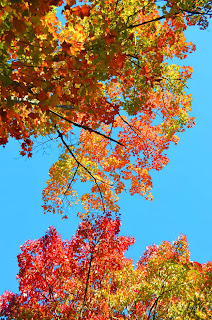 It's always a good idea to look up when you're surrounded by beautifully colourful trees. The contrast of those magnificent leaves against a bright blue sky is not to be missed!
Working in Lightroom, I've taken a couple of images that I shot in the summer and following some of Kim's tips, I've played around to create an autumn feel to them.
 |
| Before |
 |
| After |
 |
| Before |
 |
| After |
I was able to add a nice, warm glow to the images, and yet, nothing beats the wonderful fall colours I captured in these images, which I took last fall while up at the cottage. With the incredible forecast for the next week or so, I sure wish I was up there and not down here in the city!
 It's always a good idea to look up when you're surrounded by beautifully colourful trees. The contrast of those magnificent leaves against a bright blue sky is not to be missed!
Wednesday, July 24, 2013
Puppy Dog Eyes...
 Okay, she's actually 13 years old, but to me Casey will always be my puppy! Inspired by Kim Klassen's prompt, like I need an excuse, I've been shooting Casey in various poses. Notice the ears in the breeze...she sure loves her boat rides...
as evidenced by that wonderful smile as she relaxes on the back seat of the boat.
I just might be biased, but I think she's just the sweetest dog there is!


Tuesday, June 18, 2013
Great Blue Heron
 Last weekend I saw this beautiful Great Blue Heron patiently waiting for his dinner outside the Cambridge Mill.
  There is something about these wonderfully majestic birds that intrigues me. I'm fortunate to be able to enjoy them at our cottage, by the pond near our home and out on various explorations while cycling, etc. and yet I just never get tired of watching them!
They always make me smile too, as I recall the one that used to visit my parent's backyard to steal the koi from Dad's pond. Dad finally made a wonderful wooden model of a heron and put it by the pond as a decoy to ward off the real one.

"3112" texture compliments of Kim Klassen.
Linking up with Our World Tuesday, Texture Tuesday, and Sweet Shot Tuesday.
Monday, May 27, 2013
Wisteria Lane...

Just a few doors down, there is a lovely bed and breakfast with the most beautiful side arbour, covered in wisteria! As you can see from these images, there is the most glorious covering of purple blossoms.
After spending more than we should have at Stitch, we enjoyed a delicious lunch outside on the patio of Zooma Zooma, a great little restaurant in the village.
It was a perfect day, spent with a wonderful friend.

Linking up with Our World Tuesday, Texture Tuesday, and Sweet Shot Tuesday.
Thursday, April 4, 2013
Colours of Spring
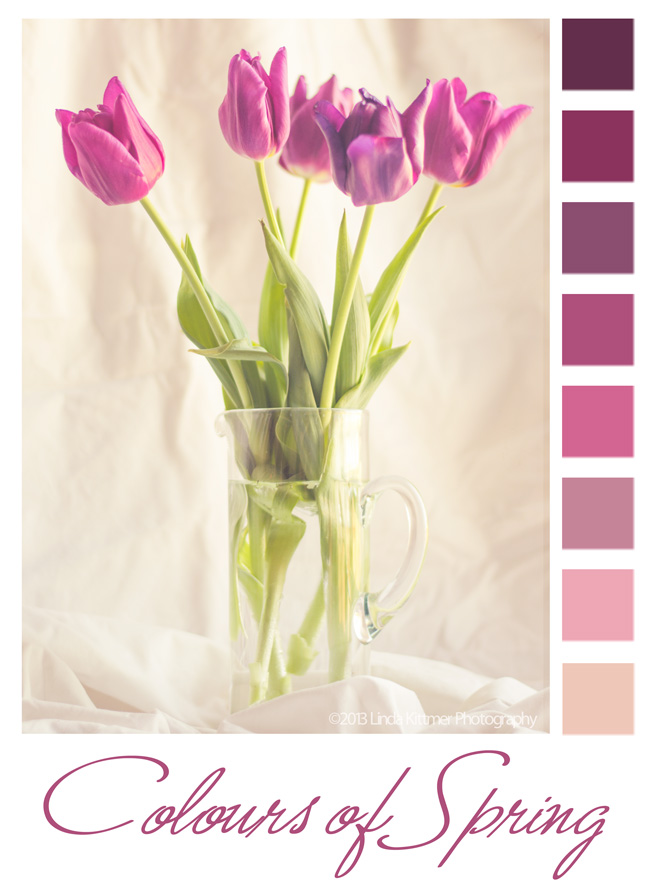 Today in Beyond Beyond or 2B as we refer to it, Kim taught us another, easier way to create colour palettes in Photoshop Elements. I love creating these from my photos, and sometimes use them for inspiration in my fibre art or art journalling.
 |
| Raw image right out of the camera |
I know I've told you this before, but I also love Lightroom 4! It opens up so many incredible possibilities. I've learned how to create my own presets, so that I can apply several steps of an edit to an endless number of photos. Again thanks to Kim and 2B, I was able to create a preset today that would warm up an image and give it a bit of a hazy, dreamy effect. The best part is that because I've created a preset for it, I can now apply that same effect the other images with literally just one click!
There are so many wonderful things that can be done when you combine the best of both of these programs.
Monday, March 11, 2013
Vicariously Visiting Ace Hotel in Palm Springs...
Have I ever mentioned how much fun it is to play with photos and digitally alter them? Today's image is a compilation of an image that Kim gave us to play with in Beyond Beyond (the chairs sit outside the Ace Hotel in Palm Springs) and a photo of me when I was a little girl. I've never been to California, but a girl can play!
 Linking up with Beyond Beyond, Our World Tuesday, Texture Tuesday, Sweet Shot Tuesday
Tuesday, February 26, 2013
Dreamy Image
I explored Kim Klassen's tutorial on creating a 'dreamy' look to your image, and here's my result:
 I used an image of my journal and Twinkling H20 watercolours, which I had been working on earlier. I had used my 50mm 1.8 lens so that I could get that sweet depth of field.
I added a gradient using a soft pink to pick up some of the colour in the journal and the one paint pot. In Lightroom, I edited Kim's texture, Edith, changing it from a gold colour to a pink tone and then added it with a soft light blend mode at a low opacity (around 35% or so). The text was added using the font Sweetly Broken, and I picked a very soft pink shade from the image for my text colour. I also had to add a bit of a drop shadow to get the text to stand out enough to be legible without having to go to a darker font colour.
Linking up with Our World Tuesday, Texture Tuesday, Sweet Shot Tuesday
I used an image of my journal and Twinkling H20 watercolours, which I had been working on earlier. I had used my 50mm 1.8 lens so that I could get that sweet depth of field.I added a gradient using a soft pink to pick up some of the colour in the journal and the one paint pot. In Lightroom, I edited Kim's texture, Edith, changing it from a gold colour to a pink tone and then added it with a soft light blend mode at a low opacity (around 35% or so). The text was added using the font Sweetly Broken, and I picked a very soft pink shade from the image for my text colour. I also had to add a bit of a drop shadow to get the text to stand out enough to be legible without having to go to a darker font colour.
Linking up with Our World Tuesday, Texture Tuesday, Sweet Shot Tuesday
Saturday, February 9, 2013
Not Your Average Chipmunk...

I don't often take video, but in the summer, when my little friend Charlie was coming to visit for peanut treats, I decided to document it by using the video camera on my iPhone. You may be getting sick of hearing this, but Lightroom is amazing! Today in Round Trip, I learned that you can very easily capture jpeg images from video you've shot. That's how I got this wonderful series of me feeding and patting my little chipmunk friend.
You might also enjoy an older post in which I've included a short video of my giving one of the chipmunks a bit of a back rub. This particular chipmunk would come up on my lap to be patted even if I didn't have any peanuts for it.
It's quite amazing, but we've taught our Golden Retriever, Casey, to leave the chipmunks alone. All I have to say if one comes up on the deck is, "Leave it Casey. That's mom's friend." and Casey will just watch it and not bother it at all. They have become so used to one another that the chipmunks will sometimes go up and sniff her paws while she's sleeping. If she notices she just lifts her head and looks at them.
And it would seem that she can tell the difference between chipmunks and red squirrels (which can be very annoying and destructive) because she'll chase them away if they come on the deck. She's one smart dog!
Tuesday, January 29, 2013
An Odd Still Life...

I've been spending a lot of time in Lightroom these days, learning the ins and outs of the program thanks to Kim Klassen's Round Trip online course. The more time I spend in Lightroom, the more I'm loving it. My image files are finally getting organized in a logical way and I can find them within seconds instead of having to search through endless places on my hard drive, sometimes never finding the shot I was looking for...they were in a real mess! Once I finish adding keywords to all my archived photos (something I'll be working on a bit at a time over the next couple of weeks...or months) I will be able to find any shot with a few quick key strokes!
Today I've been experimenting with the 'develop' part of the program in which you can do some pretty amazing processing of your images and save presets of multi-step adjustments to be used over again. I've only been at it for a short time, but I am already loving the capabilities of this software! I can't wait until I actually know what I'm doing! It also works seamlessly with Photoshop Elements, so I can add textures, text, etc. and then pop back into Lightroom again to catalogue the finished image. So fabulous!
Today's image is a silly still life of an apple, an orange and a frog (I needed a third and the frog was within reach). I really never intended to do anything with the shots I took...I was just goofing around with taking raw images and doing some processing in Lightroom, but I kind of like the end result.
This photo is being linked to Our World Tuesday, Texture Tuesday, Sweet Shot Tuesday, Photo Art Friday and Orange You Glad It's Friday.
Tuesday, January 22, 2013
Idleness...

I took this shot a couple of years ago, but since I've been organizing my images in Lightroom 4 (got that for my birthday too!) I came across it and just had to use it along with this quote. I found the quote while working on a fibre art piece that uses my rust dyed fabrics.
 |
| original image |
These photos are being linked to Our World Tuesday, Texture Tuesday, Sweet Shot Tuesday, and Photo Art Friday.
Monday, January 14, 2013
You Can Do Anything...

Kim's challenge in Beyond Layers today is to use her sample photo of tulips on a black background and process it any way we want. We'll then link up and compare what we've all done.
 |
| Kim's original image |

Sunday, April 29, 2012
The Life of a Dandelion


I've been working in the garden today, adding mulch to all the beds to clean things up and hopefully deter some of the weeds that seem to flourish in our garden. Before my husband had a chance to pull them all, I took some photos of the dandelions in their various stages of development so that I could play with the tutorial Kim gave us in Beyond Layers this week. Now all I need to do is to figure out how to slow it down so it's not quite so dizzying to look at.
Update: still trying to learn how to slow down the gif, but I did figure out a trick that seems to help.
Update #2: I learned another Photoshop trick from Kim so I've added this multi-image shot of the same photos used in the animation.


Tuesday, March 27, 2012
Texture Tuesday: Pink
For this weeks Texture Tuesday photo, I was having some fun playing with hue/saturation. The theme was pink and I didn't have a great subject for pink, but I had just taken this photo of old bottles and I just love them. Although their original colour is wonderful, I decided to play with them and make them fit the 'pink' theme. :o)
After doing the hue/saturation adjustments, and a bit of a levels adjustment, I added Kim's 'dustyrose' texture a couple of times (see to the left for blend modes and opacity). What better than a pink texture to work into this week's theme!
If you haven't signed up for Kim Klassen's "Texture Lovin' List" yet, what are you waiting for? Kim generously provides download links to wonderful and free textures every week! Just click here and sign up (the box is near the top right of the page).
 |
| Mouse over photo to see the 'before' image. |
If you haven't signed up for Kim Klassen's "Texture Lovin' List" yet, what are you waiting for? Kim generously provides download links to wonderful and free textures every week! Just click here and sign up (the box is near the top right of the page).
Monday, March 12, 2012
Texture Tuesday: Free and Easy
This weeks prompt for Texture Tuesday was 'free and easy'. We were to choose any photo and add one of Kim's textures. I took this picture back in the fall when I was out driving in the country. You've got to love that face! Wouldn't this make a great poster in an orthodontist's office? LOL
 |
| Mouse over photo to see the 'before' image. |
Monday, March 5, 2012
Texture Tuesday: White
 With the theme 'white', daisies are just the perfect flower to photograph. That little pop of yellow and green bring a added life to such a classic, simple flower. Daisies make me think of childhood and innocence! "...loves me...loves me not..." Oh the sweet memories of lazy summer days with my friends.
Thanks for visiting! :o)
Monday, February 20, 2012
Texture Tuesday Theme for February 21: Use the 'Felicity' texture
While visiting our friends Eleanor and Ted, I had some fun taking various photos. It's always great to have new things to capture, and Eleanor has some beautiful, inspiring things in their home. This gorgeous star hangs on a wall in the TV area. I was drawn to the wonderful colour and texture of the metal star.
 Here's the screen shot of the processing I did in Photoshop Elements.
A big thank you goes to Kim Klassen for the beautiful Felicity texture. I love the vintage feel it gives the photo.
 |
| Mouse over photo to see the 'before' image. |

A big thank you goes to Kim Klassen for the beautiful Felicity texture. I love the vintage feel it gives the photo.
Sunday, February 5, 2012
Love Me, Love Me Not...

These pics were taken in my studio, on my white sewing table. I didn't quite have the bright sunlight I was hoping for, but overall I'm happy with the results. After creating the collage, I added a couple of Kim Klassen's wonderful textures: "...and then some" at soft light 85% and then "revolution" at multiply 26%.
Thursday, January 19, 2012
Photography: My Other Passion
 In addition to my fibre art, my other passion is photography. I have taken Kim Klassen's wonderful (and free) online course called Skinny Mini which taught me the basics of Photoshop Elements 9, allowing me to digitally alter my photos. That led me to want to learn more, so I signed up for her Photoshop Essentials course (which was fabulous). Now, I have decided to participate in Beyond Layers - a Year of art~FULL Inspiration. This promises to be "52 weeks of encouragement, motivation and inspiration.......centred around, but so much more than photoshop...."
This photo is my first week's assignment. The photo was taken while walking on the Bruce Trail with my dog Casey.
About the photo:
f/5.6, 1/250, ISO 100, Lens: AF-S DX VR Zoom-Nikkor 18-55mm f3.5-5.6G
Processing:
-added Kim Klassen's texture 'awaken' at soft light 100% opacity
-used a layer mask and removed the above texture from the focus plant feature
-added 'awaken' texture again, this time at screen 41% opacity, again using a layer mask and removing the texture from the focus plant feature.
-text layers were added
-added Kim's texture 'february magic edges' at screen 100% opacity
Subscribe to:
Posts (Atom)