Showing posts with label Texture Tuesday. Show all posts

Tuesday, April 16, 2013

Celebrate Spring..

Every the optimist,  in spite of ice storms and resulting power outages because of all of the trees and branches that came down, I am celebrating Spring... because I know that one day it will come!


Linking up with Our World Tuesday, Texture Tuesday, and Sweet Shot Tuesday.
Sunday, April 7, 2013

Tulips Two Ways...

 For this weeks 2-For eDition, in addition to using two textures on the image I'd also do two different images, in two different ways.  I was intrigued by these purple tulips and the fact that one still looked so beautiful while all of the others had dropped their petals so I took this shot, and as I was processing it this quote came to mind...how perfect for that one tulip to hang in there in spite of what was happening around it.  :o)

The second image is another colour palette.  I just about went crazy making it because my colour squares kept coming up sort of soft and almost pastel and it just wasn't right.  I actually deleted all of the layers and started again...Note to self:  Make sure brush is at 100% opacity before stamping! :P


If you're interested in the steps I used for processing, you can see the screen shots of each image below.


Linking up with Our World Tuesday, Texture Tuesday, and Sweet Shot Tuesday

Tuesday, March 26, 2013

Crocus are Blooming!


A few days ago I took this shot of some of my crocus, while just a few steps away my dog, Casey lay in the snow.  She's in a bit of a panic because she loves the snow and knows it's going fast so any chance she gets she lays on it or walks through it.

Kim's challenge this week for Texture Tuesday is 'flower power' so these little guys came up just in time.  I used a bit of a comic sketch filter on the image, added a layer of Kim's kk-2203 texture at a soft light blend mode of 60% opacity and then I added the text on an eliptical shape as Kim demonstrated this week in Beyond Beyond.

Monday, March 18, 2013

Water and Ice...


I took this photo a few weeks ago while exploring along the Bruce trail.  It was a mild winter day, and the textures in the ice and the water were stunning.  I did a couple of very minor adjustments to the levels and contrast and then I added a subtle gradient mask to get a bit more of the sparkle back in the water without loosing the definition in the ice.

I added a layer of Kim Klassens "cool grunge' texture using a hard light blend mode at 15% and then finished off by creating a soft frame using an inverse selection and adding a colour adjustment at a low opacity with a soft light blend mode.

The final steps to the edit were to add the quote and my signature.  The quote uses 'Journal' font.

As much as I like the beauty of the ice and snow, I look forward to images of Spring, hopefully in the very near future!

Linking up with Our World Tuesday, Texture Tuesday, and Sweet Shot Tuesday

Tuesday, February 26, 2013

Dreamy Image

I explored Kim Klassen's tutorial on creating a 'dreamy' look to your image, and here's my result:

I used an image of my journal and Twinkling H20 watercolours, which I had been working on earlier.  I had used my 50mm 1.8 lens so that I could get that sweet depth of field.
I added a gradient using a soft pink to pick up some of the colour in the journal and the one paint pot.  In Lightroom, I edited Kim's texture, Edith, changing it from a gold colour to a pink tone and then added it with a soft light blend mode at a low opacity (around 35% or so).  The text was added using the font Sweetly Broken, and I picked a very soft pink shade from the image for my text colour. I also had to add a bit of a drop shadow to get the text to stand out enough to be legible without having to go to a darker font colour.

Linking up with Our World Tuesday, Texture Tuesday, Sweet Shot Tuesday

Tuesday, February 5, 2013

A Pop of Colour...

Yesterday, while driving to my daughter-in-law's place, I passed this beautiful church and it immediately reminded me of Kim's challenge for this week's Texture Tuesday, 'a pop of colour'. Fortunately I had brought my camera along with me because I knew I'd be driving along country roads and I planned to get some barn shots on my way home, but when I saw this wonderful bright red door on the church I knew it was perfect for for the challenge.  I created the collage in Lightroom, and then added a subtle layer of Kim's texture, 'stamped' using a soft light blend mode to give it a cool, soft look. I used a layer mask and brushed the texture off of the white frame and sashing of the collage, as well as the red door so that the wonderful colour could 'pop'.

This photo is being linked to Our World Tuesday, Texture Tuesday and Sweet Shot Tuesday.

Monday, November 12, 2012

Day Dreaming at My Desk


Mouse over photo to see the 'before' image.
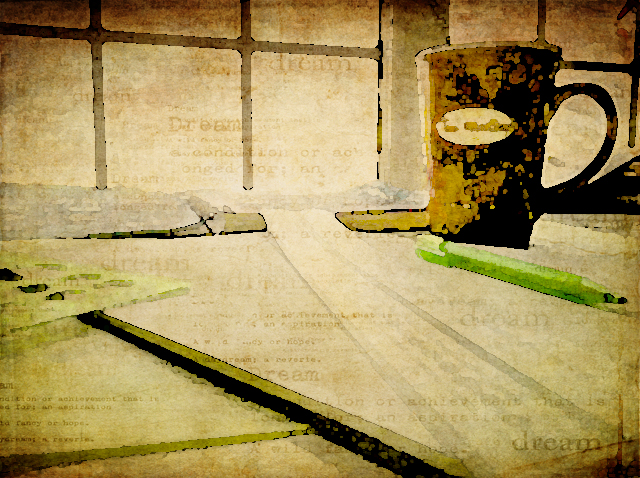
Now that I've got my new desk in my studio, I sometimes find myself day dreaming as I look out the window.  Since this weeks photo themes from Kim at Texture Tuesday and Bonnie at Photo Art Friday compliment one another so well to all this day dreaming, I challenged myself to take a very ordinary iPhone shot of my desk today and edit it in Photoshop to try to create an dreamy, artful still life.

I started with a levels adjustment and then played with the brightness and contrast to get back my Tim Horton's mug which is very dark in the original image.  I added Kim's kk_kristen texture, first at multiply 100% and then again using a soft light blend mode at 27%.

I put on a warming photo filter, flattened the image and then added a watercolour filter to that.  Next I added a couple of painterly textures (a Jerry Jone's painterly texture, and one of Bonnie's painterly textures, both with a soft light blend mode at 100% opacity).  The final edit was to add Kim's kk_dream texture. It just seemed perfect for the 'Dreamy' theme with it's soft subtle 'dreamy' text.

These photos are being linked to Our World Tuesday, Texture Tuesday, Sweet Shot Tuesday, Photo Show Off,  This or That Thursdays, Photo Art Friday, and Fabulous Friday.

Monday, October 15, 2012

Look Up...Way Up...


Kim's challenge this week for Texture Tuesday was to have us looking up.  This is the perfect time of year for this as the colours in the autumn trees are spectacular!  I added three of Kim's textures to this image: Just Stitched, Trust, and Warm Sun.  I love that bit of zigzag 'stitching' at the sides. I brushed away some of the texture from the centre of the image so that the colours of the leaves were a little more intense in the centre.  


This next image, of my dog Casey snoozing on the dock, was taken a couple of weeks ago, the day before we closed up the cottage.  Bonnie's challenge for Photo Art Friday was to use her Leafy Landscape texture to create our 'photoartography' (that's my new word for today...Have you read the book Frindle?...just saying...).  I started by adding a gradient map to take the original image to black and white.  After adding the texture, I added a 'sponge' filter and bumped up the hue/saturation levels. 


Notice my signature?  That's another neat trick Kim taught us in Beyond Layers!  And, I just found out that Kim is starting the third session in January!  I highly recommend it if you want to learn more about how to use Photoshop Elements or CS!

These photos are being linked to Our World Tuesday, Texture Tuesday, Sweet Shot Tuesday, Photo Show Off,  This or That Thursdays, Photo Art Friday, Shoot, Edit, Submit, Fabulous Friday, and Photo Friday Link Party.

Tuesday, May 1, 2012

A Bird in the Hand...


This beautiful young gold finch knocked itself into a stupor when it crashed into our cottage window last summer.  Fearing that it may die of shock (or become an interest to our dog), I picked it up and held it in my hands to keep it warm.  After a little while it was strong enough that it wanted to sit up in my hand but it continued to rest with it's eyes closed as you see here.  Finally, after about 30 minutes it started to look around and when I put it closer to a tree limb it flew up into the tree.  

This post has been linked to Texture Tuesday, Sweet Shot Tuesdays, Photo Art Friday (book connection: A Bird in the Hand, by Ann Cleeves), and Photo Friday Link Party.  You might be interested in taking a look at some of the other photography that is being shared on these sites.

Monday, April 23, 2012

Bravery Personified


In Kim Klassen's Beyond Layers this week, the focus is on bravery.  Although this can mean so many different things to so many people, the first image that comes to mind for me when I think of bravery is a firefighter.  As the quote I used in this piece suggests, just the fact that someone chooses to become a firefighter is a phenomenal act of bravery.

This photo was taken last summer when I was out cycling and I came upon the tragic fire in the town of Magnetawan.  Sadly, the general store and 'June's Restaurant' as it was known to locals, was lost to the fire.
Note:  It was a really hot summer day. Add to that the heat from the fire and it must have been sweltering in that uniform!


This post has been linked to Texture Tuesday, Sweet Shot Tuesdays, Photo Art Friday, and Photo Friday Link Party.  You might be interested in taking a look at some of the other photography that is being shared on these sites.

Monday, April 16, 2012

Spring Beauty

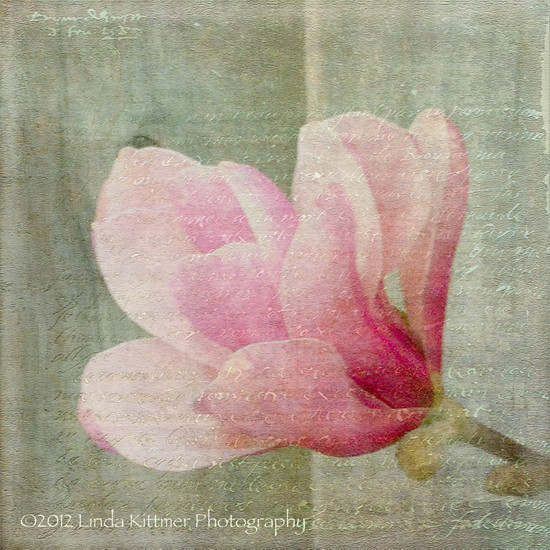
I love the beautiful magnolia trees that are all in bloom these days, marking the signs of new life as we enjoy warm Spring days.  I took this photo with my iPhone while I was out for a walk with my dog, Casey.

I have used a couple of beautiful textures in my processing of this photo.  One is a wonderful watercolour texture, called "I Am", which was created by Kim Klassen.  The other is a fabulous texture that includes text.  It's called "Antique Farwell" and it's by Bonnie Zieman of Pixel Dust Photo Art.   My goal in my processing this week was to soften the image while adding a bit of colour to the grey of the wooden fence.  I love the added interest that the writing provides the image.

Mouse over photo to see the 'before' image.

Tuesday, April 10, 2012

Texture Tuesday: Little Things

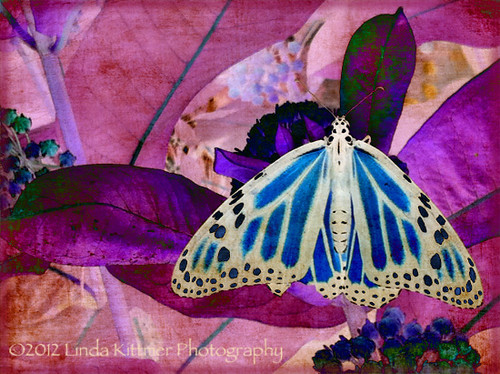
Today's Texture Tuesday challenge was simply to use Kim's 'little things' texture.  As I considered a subject matter for the photo, I remembered this photo of a monarch butterfly that I took last summer.  Seeing as it is a 'little thing' itself, I thought it would be perfect.  I opened Photoshop Elements and I started to play.  I tend to fall back on the same few blend modes when I apply textures (usually soft light, screen or multiply at varying opacities depending on the image I'm striving to achieve), but this time I was just exploring some of the other options when I came across 'difference'.  I thought it created a wonderfully intriguing change to the image.  So much so, in fact, that it has inspired me to create a piece of fibre art with this image.  I love the colours that resulted in the altered image.  I'm not sure the direction this piece will take, but I will certainly share it as it progresses.  For now, go ahead and mouse over the image to see the original photo.

Mouse over photo to see the 'before' image.
I will also be linking this to Bonnie's Photo Art Friday.  If you love photo art, you might be interested in checking out her blog.

Tuesday, April 3, 2012

Texture Tuesday: Soft

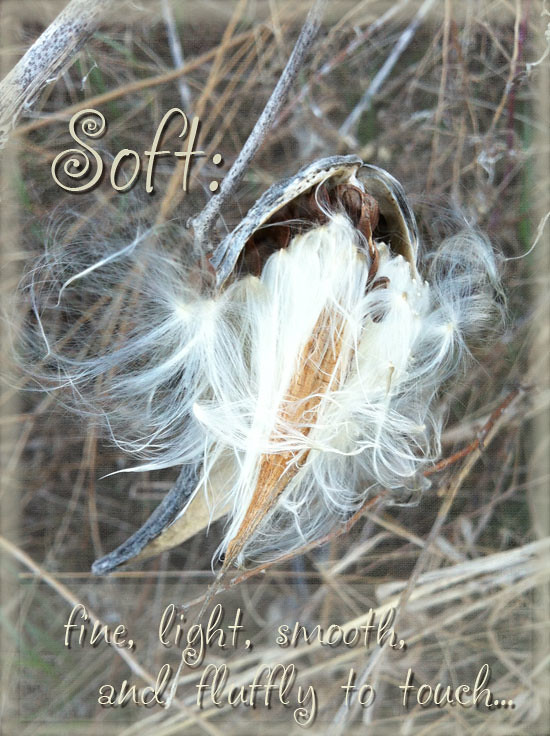
Today's Texture Tuesday theme is soft and as you would have it, while walking my dog yesterday I came across these wonderful milkweed seed pods that had opened to release the silky, soft seeds within.  I decided to try to soften the overall image using one of Kim's wonderful textures at a fairly low opacity of the soft light blending mode.  I had to remove the texture from the actual seeds because they became too washed out, but I think I have achieved the softness I was going for.  I also used the tricks that Kim taught last week to soften the edges of the image, framing it with the same softness.

Mouse over photo to see the 'before' image.

Tuesday, March 27, 2012

Texture Tuesday: Pink

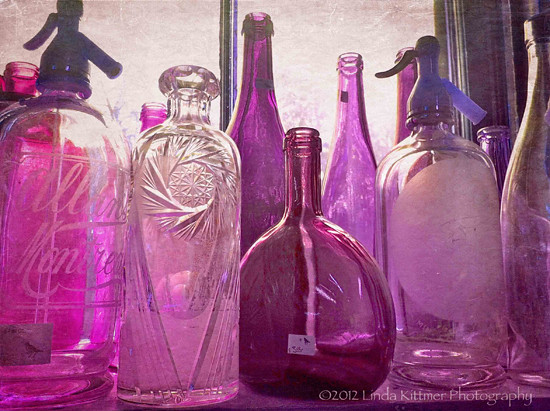
For this weeks Texture Tuesday photo, I was having some fun playing with hue/saturation.  The theme was pink and I didn't have a great subject for pink, but I had just taken this photo of old bottles and I just love them.  Although their original colour is wonderful, I decided to play with them and make them fit the 'pink' theme.  :o)

Mouse over photo to see the 'before' image.
After doing the hue/saturation adjustments, and a bit of a levels adjustment, I added Kim's 'dustyrose' texture a couple of times (see to the left for blend modes and opacity).  What better than a pink texture to work into this week's theme!

If you haven't signed up for Kim Klassen's "Texture Lovin' List" yet, what are you waiting for?  Kim generously provides download links to wonderful and free textures every week!  Just click here and sign up (the box is near the top right of the page).

Monday, March 12, 2012

Texture Tuesday: Free and Easy

This weeks prompt for Texture Tuesday was 'free and easy'.  We were to choose any photo and add one of Kim's textures.  I took this picture back in the fall when I was out driving in the country.  You've got to love that face!  Wouldn't this make a great poster in an orthodontist's office? LOL

Mouse over photo to see the 'before' image.

Monday, March 5, 2012

Texture Tuesday: White

With the theme 'white', daisies are just the perfect flower to photograph.  That little pop of yellow and green bring a added life to such a classic, simple flower.  Daisies make me think of childhood and innocence!  "...loves me...loves me not..." Oh the sweet memories of lazy summer days with my friends. 
Thanks for visiting!  :o)

Thursday, February 16, 2012

Texture Tuesday Theme for February 14: "Happiness"

Happiness is a good book.  
This photo was taken in my friend Eleanor's kitchen.  She has a shelf filled with a wonderful collection of beautiful vintage books and her fabulous hand-made teddy bear sits on the shelf with them.  The sun was just right, giving this photo a wonderfully warm feel.  I love the shadows and the golden glow that I was able to capture.  
I'm posting this for Texture Tuesday, but I must admit that this time I didn't do any processing to this photo at all.  Sometimes everything just lines up perfectly in a photo shoot and nothing more is needed!  :0)

Tuesday, January 24, 2012

Texture Tuesday Theme for Jan. 24: "A Love Story"

This week's Texture Tuesday theme is "story" and what better story this time of year than a love story?  This picture was taken a couple of years ago.  Pictured are Casey, our golden retriever, and Spencer who was known as our 'puppy cat' because he behaved more like a dog than a cat.  As the photo suggests, these two were inseparable buddies and they would often be found sleeping cuddled together.  

About the photo:

-taken with my old point and shoot HP digital camera
-Kim Klassen's "all my lovin" texture at soft light 100%
-second layer of "all my lovin" texture at multiply 68%
-finally added Kim's "February magic edges" texture at screen 75%


Sunday, January 22, 2012

Texture Tuesday Theme for Jan. 17: "Open"

The Texture Tuesday theme for last week was 'Open' and this image came to mind immediately.  I took this photo back in October while out walking some trails with my dog.  I love the way the sun made the wispy white 'hairs' on the milkweed seeds to just sparkle.  I added Kim Klassen's 'annabelle' texture using the multiply blend mode at 90% opacity.