Showing posts with label Photoshop Elements. Show all posts

Monday, December 16, 2013

Playtime...


Yup, I just had to play with captions this week.  Needless to say, Casey and Dime are really enjoying one another!  And when the play is done they catch a few zzz's together too!


Monday, December 2, 2013

Casey and Dime...


The day I took the above shot, I thought it was so funny.  Dime had discovered he could sit inside the ring at the bottom of the kitchen stool, and he sat there for the longest time.  If I had put him there I'm sure he would have jumped right out...but since it was his idea he just sat there like that for about 10 minutes!  Too funny!!!

Some days Dime seems like he's getting so big, and other times he still seems like a little puppy, but when I look back over the weeks, I can see him maturing so fast! It seems especially evident in his adorable little face!

And he and Casey are never far apart.  When Dime and I go out, Bill tells me Casey looks around the house for him, and when we return the two of them always have a wonderful reunion!


Here they are...both 13...Dime at 13 wks. and Casey at 13 yrs.!

Wednesday, November 6, 2013

Progress on Shadows...

I've finished the hand stitching of the text on this 'Shadow' piece, and I've outlined the shadows themselves with back stitch.  
I had planned to fill in the shadows using tiny running stitches in the traditional Kantha style, but it just doesn't have the impact I want.  I think because of the texture of the actual fabric on which I transferred this image, those subtle stitches are lost.  I guess my next step will be to pull those stitches out and then figure out what I want to do instead.  
I'm also planning some machine quilting in the background, probably with a variegated thread that will blend in with the variety of golds, tans and browns in the image.  

Some many ideas, and so little time!  Dime is keeping me busy, as would be expected, but he's doing great.  I fit my stitching in during his naps, so I'm not as prolific as I was before he arrived.  Kind of reminds me of being a new mom. LOL  

Tuesday, July 16, 2013

Ann's Rusty Sewer Grate...

I've been working on the next GOE challenge piece, which required us to use the inspiration of a rusty sewer grate that is on a golf course in Mexico.  My friend Ann was busy taking photos of the grate while golfing...is this why she never made the Women's PGA tour???
I started by manipulating the photo in Photoshop Elements so that I could create a unique collage of the many rusty lines in the grate.
 I used machine stitch to create some of the grass, using long free motion stitches.  I also thread sketched in all of the black areas between the grate lines to make them recede further back.


Hand stitch was used to create bolder grass lines in some areas and then I used French knots and some simple straight stitches to further encrust the rusty grate lines.  I intentionally let the rusty areas rise up from the surface to create the 'bubbling' texture that rust creates on metal.

It has been framed in a 12" x 12" frame.


Monday, July 1, 2013

My Gentlemen

While at a Wedding in June, I took this photo of my special men.  I knew that the light was wrong, as I was shooting up at quite an angle and the sun was behind them, but it turned out to be a wonderful silhouette.  I removed a few minor distractions from the background so that all of the focus is on the four men.

"Confidence" texture compliments of Kim Klassen.

Linking up with Our World Tuesday, Texture Tuesday, and Sweet Shot Tuesday.

Sunday, June 9, 2013

Another Piece of Rust...

The current GOE challenge has me working with rust again, but this time I'm approaching it in a whole new way.

Ann, one of our GOE members took these photos of a rusty grate while she was on a golf course in Mexico (perhaps this is why she never make it on the Women's PGA Tour...just saying...).

I can't reveal too much yet, but I thought I'd give you a peek at the machine stitched grass I've been working on.  I've layered some tan thread under the green to give it the texture and colour of the old, dead grass that's under some of the healthy green grass in the photo.  Instead of using rust dyed fabric (which is too hard to work with right now with the cast and all), I've edited the original images in Photoshop Elements and then trasferred it to a piece of cotton using Transfer Artist Paper.
This image shows a bit of the hand stitching I've started to accent the larger blades of grass.

I'm having fun with this piece, but it's  frustrating me that the hand stitching is causing me pain. I've decided that in the interest of my hand I'm going to have to lay off all hand work until I've healed.  I can't wait to get this cast off!

Monday, May 6, 2013

"Pop"


This week's photo challenge was "Pop" over on the Texture Tuesday site, so I decided to focus on that all important pop of colour that we see this time of year with the arrival of the first Robins of the Spring.  This photo was taken a few weeks ago, before our final snow storm, but it just seemed to provide that hope and promise of things to come. That bright orange breast and belly are a sure sign that winter is finally over!

I did a bit of an adjustment layer before adding Kim's new texture, kk_may, I also had to add a layer of some subtle grey behind the text so it didn't get lost in the cedar.


You can see a screen shot of the processing at the bottom of the post.


When thinking about pops of colour, flowers always 'pop' to mind too, so I've added these other two images, both treated with a layer of kk_may at soft light, with a mask on which the texture was removed from the focal blossom.


Linking up with Our World Tuesday, Texture Tuesday, Sweet Shot Tuesday and Orange You Glad It's Friday.

Thursday, May 2, 2013

Artists in Blogland

Marcia over at Artists in Blogland put out a call this week for a new blog button for the Show & Tell Saturday link up, so I used a piece of my art journalling and played around in Photoshop Elements to create this button.

Click on the link here to pop over to the site and get the code.  It's available in two sizes, depending on the set up of your particular blog.

And be sure to visit again on Saturday to see some of the wonderful things that the 'Artist in Blogland' are doing!

Tuesday, April 16, 2013

Celebrate Spring..

Every the optimist,  in spite of ice storms and resulting power outages because of all of the trees and branches that came down, I am celebrating Spring... because I know that one day it will come!


Linking up with Our World Tuesday, Texture Tuesday, and Sweet Shot Tuesday.

Thursday, April 11, 2013

Without Light There is no Shadow...

Bonnie's challenge this week over at Photo Art Friday is 'shadows and/or light' so I had to use an image which I had taken a couple of summers ago.  I had been out walking the dog in the late evening (although I'm not sure where Casey is...?) and my long shadow just caught my attention.  Thank goodness for iPhones!

 Here are the components I used:

         Original image        PDPA-Antique Farewell        PDPA-Gauze Sheers                 PDPA-Ma Belle 2


This next image is of an African Hammerkopf that I shot while visiting the Toronto zoo back in October.  This is straight out of the camera.  I just love the light and shadow in this shot and knew it didn't need anything else.

Sunday, April 7, 2013

Tulips Two Ways...

 For this weeks 2-For eDition, in addition to using two textures on the image I'd also do two different images, in two different ways.  I was intrigued by these purple tulips and the fact that one still looked so beautiful while all of the others had dropped their petals so I took this shot, and as I was processing it this quote came to mind...how perfect for that one tulip to hang in there in spite of what was happening around it.  :o)

The second image is another colour palette.  I just about went crazy making it because my colour squares kept coming up sort of soft and almost pastel and it just wasn't right.  I actually deleted all of the layers and started again...Note to self:  Make sure brush is at 100% opacity before stamping! :P


If you're interested in the steps I used for processing, you can see the screen shots of each image below.


Linking up with Our World Tuesday, Texture Tuesday, and Sweet Shot Tuesday

Thursday, April 4, 2013

Colours of Spring

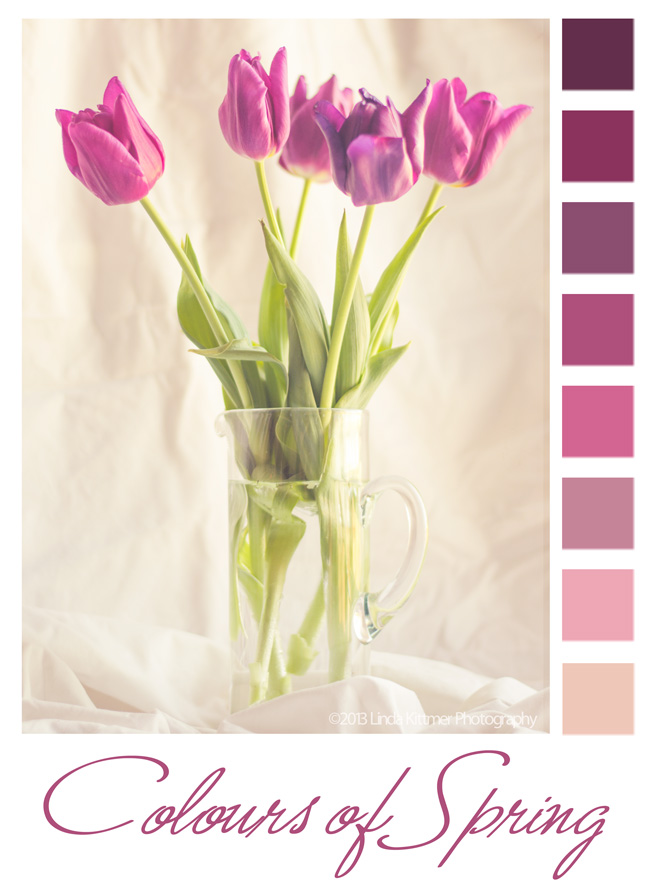
Today in Beyond Beyond or 2B as we refer to it, Kim taught us another, easier way to create colour palettes in Photoshop Elements.  I love creating these from my photos, and sometimes use them for inspiration in my fibre art or art journalling.
Raw image right out of the camera

I know I've told you this before, but I also love Lightroom 4!  It opens up so many incredible possibilities.  I've learned how to create my own presets, so that I can apply several steps of an edit to an endless number of photos.  Again thanks to Kim and 2B, I was able to create a preset today that would warm up an image and give it a bit of a hazy, dreamy effect.  The best part is that because I've created a preset for it, I can now apply that same effect the other images with literally just one click!

There are so many wonderful things that can be done when you combine the best of both of these programs.

Standing Cat Visits Toronto...


Sometimes you just have to play and sometimes all the elements just line up.

Element #1: A challenge...  Bonnie's challenge for Photo Art Friday this week is to create a collage.

Element #2: An idea...  A few weeks ago I send an email with the "mere cat" image to a number of family and friends.  My son responded by sending me with a list of about 8 or 9 links of images of the same cat in a variety of other places and scenarios, letting me know that there apparently are more where those came from.

Element #3: A photo...  On Saturday, while walking around in downtown Toronto, I took the above shot of the iconic Gooderham Building (also often referred to as the Flatiron Building) in the St. Lawrence Market neighbourhood.  As I continue to learn to use my camera out of 'auto' mode, there are sometimes some mistakes with focus, exposure, etc. (BTW, I did correct things and get a great, clear shot too).  I decided to see if I could have some fun playing with this image and the standing cat (although I see I got the wrong cat!).

Element #4: A concept...  I decided to make the cat a tourist visiting Toronto.  Thus the bag with the souvenir CN Tower inside, as well as a lovely big fresh fish from the St. Lawrence Market.  I was considering a classic Canadian touque or a Blue Jay's ball cap, but when I saw the good old 'cat in the hat' hat I just had to go with it.  I love the bright pop of red that it brings to the image.

Element #5: An inside joke...  My son is just finishing up his first year at U of T's Faculty of Law and something he told me on Saturday inspired me to find the law school logo and use it on the shopping bag that the cat is carrying.  I'm hoping this brings a bit of a smile to his face while he studies for the 6 gruelling exams he is facing in the next couple of weeks (now get back to work Lucas! =P).

Following last week's "graffiti' challenge, I just have to share this other image.  I saw this old mattress that someone had put out for garbage and it became a canvas for graffiti.  In an area where there was no other available large blank surface, this artist used what was handy!

Monday, April 1, 2013

Now and Then...Sort of...

On Saturday I went into the city to see my son, and of course my camera was in hand!  I just had to get a shot of a street car along Queen St. W.


And then I decided to play a bit and so it became an old photo...sort of...
I cropped it to take out the modern cars, but there's no denying that the streetcar itself, and the people's dress is current, so just don't look too closely.  Before adding the frame, I changed the photo to a sepia look and then added a layer of Kim's 'stamped right 1' texture at 70% soft light.  Sorry I can't give you more details on the processing, but I wasn't paying enough attention to what I was doing.


Linking up with Our World Tuesday, Texture Tuesday, and Sweet Shot Tuesday

Tuesday, March 26, 2013

Crocus are Blooming!


A few days ago I took this shot of some of my crocus, while just a few steps away my dog, Casey lay in the snow.  She's in a bit of a panic because she loves the snow and knows it's going fast so any chance she gets she lays on it or walks through it.

Kim's challenge this week for Texture Tuesday is 'flower power' so these little guys came up just in time.  I used a bit of a comic sketch filter on the image, added a layer of Kim's kk-2203 texture at a soft light blend mode of 60% opacity and then I added the text on an eliptical shape as Kim demonstrated this week in Beyond Beyond.

Monday, March 18, 2013

Water and Ice...


I took this photo a few weeks ago while exploring along the Bruce trail.  It was a mild winter day, and the textures in the ice and the water were stunning.  I did a couple of very minor adjustments to the levels and contrast and then I added a subtle gradient mask to get a bit more of the sparkle back in the water without loosing the definition in the ice.

I added a layer of Kim Klassens "cool grunge' texture using a hard light blend mode at 15% and then finished off by creating a soft frame using an inverse selection and adding a colour adjustment at a low opacity with a soft light blend mode.

The final steps to the edit were to add the quote and my signature.  The quote uses 'Journal' font.

As much as I like the beauty of the ice and snow, I look forward to images of Spring, hopefully in the very near future!

Linking up with Our World Tuesday, Texture Tuesday, and Sweet Shot Tuesday

Saturday, March 16, 2013

Dust-free Chalkboard Sign


I've been seeing a lot of chalkboard signs with vintage looking lettering lately and always being up on the very latest, Kim has been noticing this too.  She did a walk through in Beyond Beyond of a technique from Fontaholic's site on how to make your font look like chalk.  So I just had to play with the idea and a great quote I've been waiting to use...

Thursday, March 14, 2013

Remembering Oatie...


I made a special fibre postcard in honour of Oatis, a four year old miniature schnauzer that recently died because of a tragic misdiagnosis.  My friend, Donna and her husband were devastated by the loss of this little fur person, and this is just a little token to let them know that I'm thinking of them.

I altered this image in Lightroom and Photoshop to create the image for the postcard.


Some might say that he was "just a dog", but I get it Donna!


Linking up with Photo Art Friday for Bonnie's 'portrait' theme.

Thursday, March 7, 2013

This Is One Crazy Chicken!

Bonnie's challenge this week for Photo Art Friday was to do an abstract image and I had a lot of fun playing with a photo of a chicken that I shot back in the summer.  Happily I can say that I also learned something new in Photoshop Elements while doing it!

Mouse over photo to see the 'before' image.

The first step was to extend the area to the left of the chicken so that I'd have enough room for the text so I copied the left part of the image and flipped it horizontally before using the clone stamp to draw in the extra parts of the chicken wire to create the three triangular 'thingies'.  I then played around with the blend mode so that I could change up the colours to make it a more fun, graphic image.  Unfortunately, I did so many things to the image, in a trial and error sort of way, that I don't know everything that I actually ended up doing.  Suffice it to say I had a lot of fun playing.

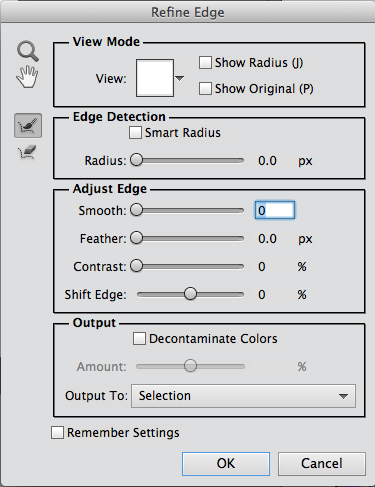
I drew in some extra 'hair' to augment the already funky head feathers that she had, and then I found a woman's face on the Internet by doing a Google search for 'blue eye'.  This is where I learned something new.  When I used the elliptical marquee tool, I discovered that you can click on a box that says 'refine edge' and the dialogue box to the right opens up.  From there I was able to feather the edge and adjust the edge detection so that it actually selected a more precise shape around the eye than what I had originally captured with the elliptical marquee tool.  In the 'output to:" section I could choose to make the eye selection a new layer and then I just had to move it into place.

Once she had that funky hair and her new and improved eye, I just had to give her a nose job too!  I found a clip art nose, which I had to flip horizontally so that it was pointing in the right direction.  The next step was to pop in Bonnie's PDPA Faded Fresco texture.  I decided to move it into the background and use it as a frame.  I rotated the chicken image slightly and then used the eraser tool to remove some of the image along the outer edges so that it wasn't such a stark square and it fit better into the 'frame' in Bonnie's texture.

I said a few weeks ago that abstracts are not my thing, but I had a lot of fun with this!  The best part was not having any preconceived notions when I started.  One thing just led to the next and the further I got into it, the sillier it became.

Tuesday, March 5, 2013

After The Storm


After the two day snow storm last week, we awoke to the most beautifully breathtaking sight out our windows. The neighbourhood was covered with a thick blanket of snow and it was early enough that it was still pristine...no footprints or tire tracks to mar the perfect covering of about six fresh inches of snow.  Then, we realized that because it was so wet and sticky, our snowblower probably wouldn't cope well with it and we'd have to shovel that heavy stuff...'sigh'.  But, on the bright side I got lots of exercise and fresh air!

Needless to say, I also took some pics.  This one was tinkered with in Lightroom, to bring up the blue tone in the sky just a bit and then I added Kim's kk_wonderfulmagic_scripted texture using a screen blend mode.  I decided to use the Sweetly Broken font for my text since I believe that's what Kim has used in some of her text around the border of the texture.

Linking up with Our World Tuesday, Texture Tuesday, Sweet Shot Tuesday