Showing posts with label Photo Art Friday. Show all posts

Thursday, April 11, 2013

Without Light There is no Shadow...

Bonnie's challenge this week over at Photo Art Friday is 'shadows and/or light' so I had to use an image which I had taken a couple of summers ago.  I had been out walking the dog in the late evening (although I'm not sure where Casey is...?) and my long shadow just caught my attention.  Thank goodness for iPhones!

 Here are the components I used:

         Original image        PDPA-Antique Farewell        PDPA-Gauze Sheers                 PDPA-Ma Belle 2


This next image is of an African Hammerkopf that I shot while visiting the Toronto zoo back in October.  This is straight out of the camera.  I just love the light and shadow in this shot and knew it didn't need anything else.

Thursday, March 21, 2013

Photo Art Meets Journalling

Bonnie's challenge this week for Photo Art Friday is 'self portrait' so I decided to combine some digital photo work with some hands on art journalling to create this spread. I started with a very low res. image that included me in a group shot that someone had posted on Facebook.  I printed it at the size I wanted to work in, and used it to trace the key shapes (head, eyes, nose, mouth, glasses).  I then used various media including Inktense pencils, Neocolor II watersoluable wax pastels, pan pastels, acrylic paint, black Pitt pen, and white Signo pen to recreate my face as well as the background and journalling on the facing page of the spread.

I took a photograph of the finished journal spread back into Photoshop Elements where I did a minor level adjustment and then place it onto Bonnie's 'inspiration' texture.

Thursday, March 7, 2013

This Is One Crazy Chicken!

Bonnie's challenge this week for Photo Art Friday was to do an abstract image and I had a lot of fun playing with a photo of a chicken that I shot back in the summer.  Happily I can say that I also learned something new in Photoshop Elements while doing it!

Mouse over photo to see the 'before' image.

The first step was to extend the area to the left of the chicken so that I'd have enough room for the text so I copied the left part of the image and flipped it horizontally before using the clone stamp to draw in the extra parts of the chicken wire to create the three triangular 'thingies'.  I then played around with the blend mode so that I could change up the colours to make it a more fun, graphic image.  Unfortunately, I did so many things to the image, in a trial and error sort of way, that I don't know everything that I actually ended up doing.  Suffice it to say I had a lot of fun playing.

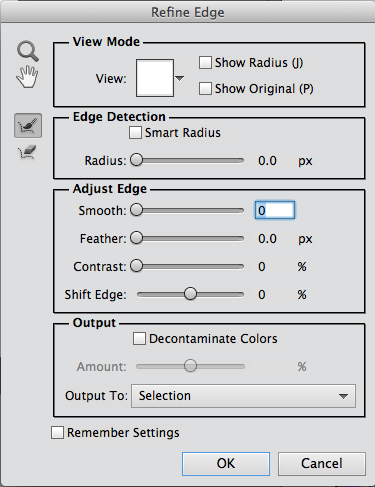
I drew in some extra 'hair' to augment the already funky head feathers that she had, and then I found a woman's face on the Internet by doing a Google search for 'blue eye'.  This is where I learned something new.  When I used the elliptical marquee tool, I discovered that you can click on a box that says 'refine edge' and the dialogue box to the right opens up.  From there I was able to feather the edge and adjust the edge detection so that it actually selected a more precise shape around the eye than what I had originally captured with the elliptical marquee tool.  In the 'output to:" section I could choose to make the eye selection a new layer and then I just had to move it into place.

Once she had that funky hair and her new and improved eye, I just had to give her a nose job too!  I found a clip art nose, which I had to flip horizontally so that it was pointing in the right direction.  The next step was to pop in Bonnie's PDPA Faded Fresco texture.  I decided to move it into the background and use it as a frame.  I rotated the chicken image slightly and then used the eraser tool to remove some of the image along the outer edges so that it wasn't such a stark square and it fit better into the 'frame' in Bonnie's texture.

I said a few weeks ago that abstracts are not my thing, but I had a lot of fun with this!  The best part was not having any preconceived notions when I started.  One thing just led to the next and the further I got into it, the sillier it became.
Thursday, February 28, 2013

Vintage...

Bonnie's challenge this week for Photo Art Friday was the word 'vintage'.  Well, after the fabulous gift I recently received there is no shortage of wonderful images to play with for this challenge!

Mouse over photo to see the 'before' image.
I chose this photo of my Dad.  It's funny to see a cigarette in his hand. He quit smoking when I was a baby so I have no memory of him as a smoker.

As you can see when you mouse over to see the original image, I cropped it to bring my father closer.  While still in Lightroom, I created a sepia version of the image.  I then took both the original cropped image and the sepia version into Photoshop Elements when I layer the sepia one over the other.  I kept it at 'normal' blend mode, but reduced the opacity to about 65% to allow some of the original colour to come back.

I know any snapshots from back then would have had a white frame around them, something that of course is missing from the digitized slides, so I brought in a vintage frame that I have in my files (sorry, I can't remember where it's from, but you'll be able to find lots such things by Googling it). I placed the photo into the frame and called it done!

Update:  I Googled 'free vintage frames for photoshop' and found this frame with the old vintage corners and the scalloped edge at this site.  There are so many wonderful 'freebies' out there! How cool is that!


Thursday, February 7, 2013

Abstract Collage...

Bonnie's challenge this week in Photo Art Friday was to play with a couple of her textures and create an abstract image.  I decided to use some more of my 'pinhead kitty' shots from last weekend's shoot.  I could see using this as some funky wrapping paper. :o)

I played around with a few other filters in Elements and came up with these additional versions.  The first one reminds me of a chalk board.


Monday, November 12, 2012

Day Dreaming at My Desk


Mouse over photo to see the 'before' image.
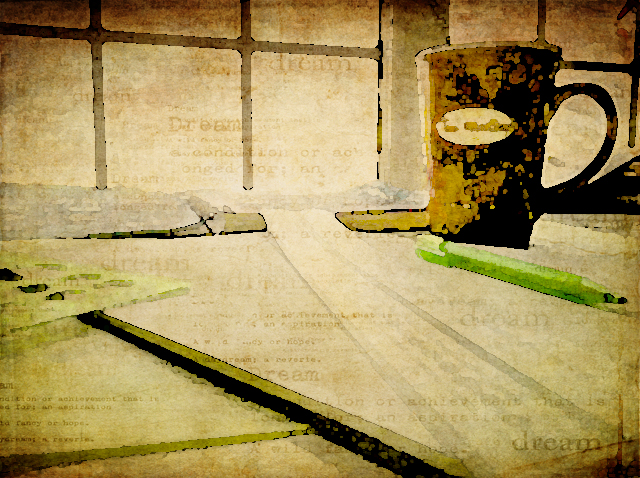
Now that I've got my new desk in my studio, I sometimes find myself day dreaming as I look out the window.  Since this weeks photo themes from Kim at Texture Tuesday and Bonnie at Photo Art Friday compliment one another so well to all this day dreaming, I challenged myself to take a very ordinary iPhone shot of my desk today and edit it in Photoshop to try to create an dreamy, artful still life.

I started with a levels adjustment and then played with the brightness and contrast to get back my Tim Horton's mug which is very dark in the original image.  I added Kim's kk_kristen texture, first at multiply 100% and then again using a soft light blend mode at 27%.

I put on a warming photo filter, flattened the image and then added a watercolour filter to that.  Next I added a couple of painterly textures (a Jerry Jone's painterly texture, and one of Bonnie's painterly textures, both with a soft light blend mode at 100% opacity).  The final edit was to add Kim's kk_dream texture. It just seemed perfect for the 'Dreamy' theme with it's soft subtle 'dreamy' text.

These photos are being linked to Our World Tuesday, Texture Tuesday, Sweet Shot Tuesday, Photo Show Off,  This or That Thursdays, Photo Art Friday, and Fabulous Friday.

Monday, October 15, 2012

Look Up...Way Up...


Kim's challenge this week for Texture Tuesday was to have us looking up.  This is the perfect time of year for this as the colours in the autumn trees are spectacular!  I added three of Kim's textures to this image: Just Stitched, Trust, and Warm Sun.  I love that bit of zigzag 'stitching' at the sides. I brushed away some of the texture from the centre of the image so that the colours of the leaves were a little more intense in the centre.  


This next image, of my dog Casey snoozing on the dock, was taken a couple of weeks ago, the day before we closed up the cottage.  Bonnie's challenge for Photo Art Friday was to use her Leafy Landscape texture to create our 'photoartography' (that's my new word for today...Have you read the book Frindle?...just saying...).  I started by adding a gradient map to take the original image to black and white.  After adding the texture, I added a 'sponge' filter and bumped up the hue/saturation levels. 


Notice my signature?  That's another neat trick Kim taught us in Beyond Layers!  And, I just found out that Kim is starting the third session in January!  I highly recommend it if you want to learn more about how to use Photoshop Elements or CS!

These photos are being linked to Our World Tuesday, Texture Tuesday, Sweet Shot Tuesday, Photo Show Off,  This or That Thursdays, Photo Art Friday, Shoot, Edit, Submit, Fabulous Friday, and Photo Friday Link Party.

Tuesday, May 1, 2012

A Bird in the Hand...


This beautiful young gold finch knocked itself into a stupor when it crashed into our cottage window last summer.  Fearing that it may die of shock (or become an interest to our dog), I picked it up and held it in my hands to keep it warm.  After a little while it was strong enough that it wanted to sit up in my hand but it continued to rest with it's eyes closed as you see here.  Finally, after about 30 minutes it started to look around and when I put it closer to a tree limb it flew up into the tree.  

This post has been linked to Texture Tuesday, Sweet Shot Tuesdays, Photo Art Friday (book connection: A Bird in the Hand, by Ann Cleeves), and Photo Friday Link Party.  You might be interested in taking a look at some of the other photography that is being shared on these sites.

Monday, April 23, 2012

Bravery Personified


In Kim Klassen's Beyond Layers this week, the focus is on bravery.  Although this can mean so many different things to so many people, the first image that comes to mind for me when I think of bravery is a firefighter.  As the quote I used in this piece suggests, just the fact that someone chooses to become a firefighter is a phenomenal act of bravery.

This photo was taken last summer when I was out cycling and I came upon the tragic fire in the town of Magnetawan.  Sadly, the general store and 'June's Restaurant' as it was known to locals, was lost to the fire.
Note:  It was a really hot summer day. Add to that the heat from the fire and it must have been sweltering in that uniform!


This post has been linked to Texture Tuesday, Sweet Shot Tuesdays, Photo Art Friday, and Photo Friday Link Party.  You might be interested in taking a look at some of the other photography that is being shared on these sites.

Monday, April 16, 2012

Spring Beauty

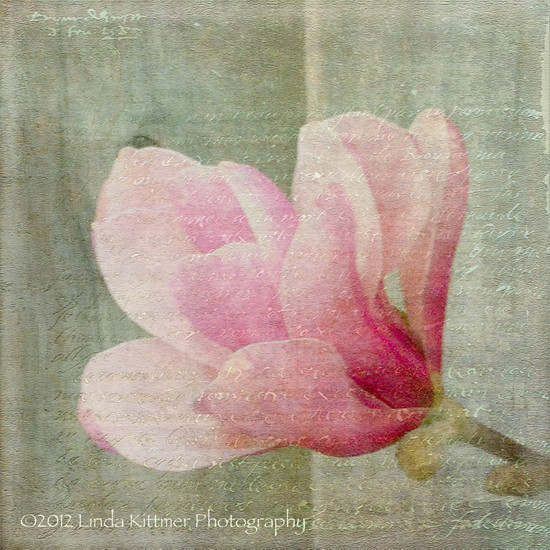
I love the beautiful magnolia trees that are all in bloom these days, marking the signs of new life as we enjoy warm Spring days.  I took this photo with my iPhone while I was out for a walk with my dog, Casey.

I have used a couple of beautiful textures in my processing of this photo.  One is a wonderful watercolour texture, called "I Am", which was created by Kim Klassen.  The other is a fabulous texture that includes text.  It's called "Antique Farwell" and it's by Bonnie Zieman of Pixel Dust Photo Art.   My goal in my processing this week was to soften the image while adding a bit of colour to the grey of the wooden fence.  I love the added interest that the writing provides the image.

Mouse over photo to see the 'before' image.