Saturday, March 9, 2013

Playing with Texture in Lettering...

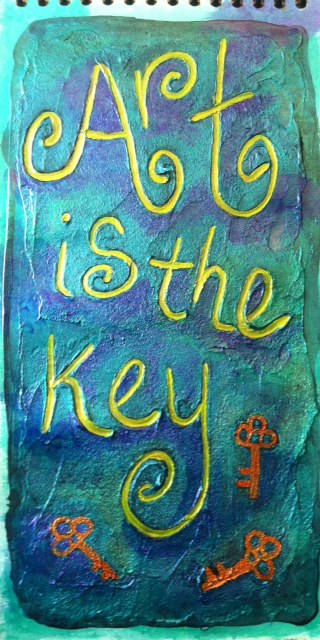
Sparked by another couple of lessons in Letter Love 201, I've been playing with texture in lettering.  Joanne had suggested an idea using heavy body paint, but instead mixed some black gesso with Golden Fiber Paste and wrote in it while it was still wet.  When it dried, I painted it using Silks Glazes.  I love the way the Silks work on black!   The close up gives a better view of the texture and depth of the lettering.  I used a rubber stamp of a key to stamp into the wet paste and gesso, but it isn't as deep as the lettering.


This piece is the favourite of a number of pieces I created using matte medium and Dylusions spray inks.  I'll end up using them as embellishments on journal pages at some point.

Friday, March 8, 2013

Plan B in the Works...

A while ago I posted about this art quilt in the making (here if you missed it), and I was looking for a 'Plan B' since my original vision for this piece was just not to be.  Well, after staring at it for a while, and considering a few different options, I think I've figured out the direction I want to go with this piece.


I've started with some surface design, using acrylic paint and some stencils.  I've also printed some text onto Lutradur, which I then hand painted using acrylic paints.  I'm not sure exactly how I plan to use the text on this piece, but it will come to me...

 As I continue to add to this piece, I'll take shots of each of the stages along the way so that you can see the 'during' as well as the eventual finished piece.  I must confess though, and those of you that know me probably know this about me, I really don't have an end in mind.  Since I tend to work intuitively, I've got some ideas and once I complete those stages I'll have to re-evaluate to see where I should go from there.  Eventually, I'll get to a place where I'm happy with it and that's when I'll stop...I hope!  I have occasionally gone past that point with some regrets :P

Thursday, March 7, 2013

This Is One Crazy Chicken!

Bonnie's challenge this week for Photo Art Friday was to do an abstract image and I had a lot of fun playing with a photo of a chicken that I shot back in the summer.  Happily I can say that I also learned something new in Photoshop Elements while doing it!

Mouse over photo to see the 'before' image.

The first step was to extend the area to the left of the chicken so that I'd have enough room for the text so I copied the left part of the image and flipped it horizontally before using the clone stamp to draw in the extra parts of the chicken wire to create the three triangular 'thingies'.  I then played around with the blend mode so that I could change up the colours to make it a more fun, graphic image.  Unfortunately, I did so many things to the image, in a trial and error sort of way, that I don't know everything that I actually ended up doing.  Suffice it to say I had a lot of fun playing.

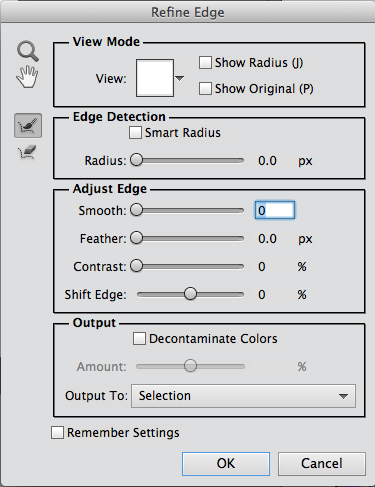
I drew in some extra 'hair' to augment the already funky head feathers that she had, and then I found a woman's face on the Internet by doing a Google search for 'blue eye'.  This is where I learned something new.  When I used the elliptical marquee tool, I discovered that you can click on a box that says 'refine edge' and the dialogue box to the right opens up.  From there I was able to feather the edge and adjust the edge detection so that it actually selected a more precise shape around the eye than what I had originally captured with the elliptical marquee tool.  In the 'output to:" section I could choose to make the eye selection a new layer and then I just had to move it into place.

Once she had that funky hair and her new and improved eye, I just had to give her a nose job too!  I found a clip art nose, which I had to flip horizontally so that it was pointing in the right direction.  The next step was to pop in Bonnie's PDPA Faded Fresco texture.  I decided to move it into the background and use it as a frame.  I rotated the chicken image slightly and then used the eraser tool to remove some of the image along the outer edges so that it wasn't such a stark square and it fit better into the 'frame' in Bonnie's texture.

I said a few weeks ago that abstracts are not my thing, but I had a lot of fun with this!  The best part was not having any preconceived notions when I started.  One thing just led to the next and the further I got into it, the sillier it became.
Wednesday, March 6, 2013

GOEs Upcoming Shows...

I've finished the promotional postcards for my fibre art group and we're ready to let the world know about our upcoming shows.  It's going to be a busy and exciting year! The images on the postcard are a teaser of some of the pieces that we'll be showing.  I hope you'll be able to come and see us!


Tuesday, March 5, 2013

After The Storm


After the two day snow storm last week, we awoke to the most beautifully breathtaking sight out our windows. The neighbourhood was covered with a thick blanket of snow and it was early enough that it was still pristine...no footprints or tire tracks to mar the perfect covering of about six fresh inches of snow.  Then, we realized that because it was so wet and sticky, our snowblower probably wouldn't cope well with it and we'd have to shovel that heavy stuff...'sigh'.  But, on the bright side I got lots of exercise and fresh air!

Needless to say, I also took some pics.  This one was tinkered with in Lightroom, to bring up the blue tone in the sky just a bit and then I added Kim's kk_wonderfulmagic_scripted texture using a screen blend mode.  I decided to use the Sweetly Broken font for my text since I believe that's what Kim has used in some of her text around the border of the texture.

Linking up with Our World Tuesday, Texture Tuesday, Sweet Shot Tuesday

Monday, March 4, 2013

Writing With Ink


This was a fun page.  I started by playing around with inks, as per Joanne's lesson 21, and one thing led to another. I had these 'Posh Rainbow Inks' by Ranger in my stash and they've got a very fine tip so you can write with them by just very gently squeezing the bottle as you go.


After using the butterscotch to write the words, I echoed them using cranberry.  I drew the flowers in the same way.  I ended up cutting them out because they just needed an interesting layered background to allow them to pop.

I started by using a lace doily and spraying with green Dylusions ink. I then layered on some blue and purple acrylic paint, using an old gift card and my fingers.  I stamped over that layer with Traci Bautista's 'creativity flows' grafitti stamp.  It was a fabulous surprise to see that some of the green Dylusions spray somehow bled through so that the stamped letters had a green caste in some places.  That's one of my favourite things about those sprays...you never know what added bonus you'll get that you could never hope to achieve on purpose!

I followed that stamping with some found object stamping to create some circles here and there and then I glued the original words and flowers I had made in place.  The final step was to do a bit of journalling and doodling using my white Signo.

Sunday, March 3, 2013

I Love This Little Bird...

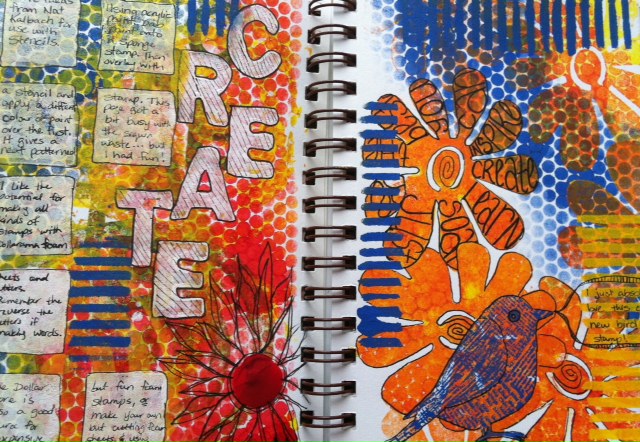
Another spread created after watching one of Nat Kalbach's jumpstarts.  I really like this idea of layering texture onto sponge stamps.  I think I got a little carried away (okay, a lot...) with the sequin waste, but as a record of the technique, it works.  I love the new bird stamp I got the other day.  I love anything with text on it so when I saw him I just had to have him.  And, again at 50% off, I don't even feel guilty!

Saturday, March 2, 2013

Creative JumpStart Revisited

During January, I was watching the Creative Jumpstart 2013 videos, and I did try out a couple of techniques, but because of various other things I was doing, most didn't get too much attention.  So, I've decided to go back through the archived 'Jumpstarts' (click on CJS 2013 if you want to access them) and create a journal with the techniques and some notes for future reference.  


 I'm really enjoying the Glass Bead Gel and with a 50% off coupon at Michaels, the price was great. I love both the texture, and how it makes the Dylusions spray inks just pop!

Thanks to Nat Kalbach and all the other Jumpstart artists, these videos are full of lots of creative ideas for using things that you may already have in your stash in some new ways.
 

Friday, March 1, 2013

Finger Painting and Some Inky Text


When I was first watching Joanne's lesson 18 video, I was laughing...yup Joanne, I was one of the ones you were threatening to send to the principal's office. LOL However, seeing as I seldom keep my fingers out of the paint when I do play with acrylics, I thought why not do lettering with my fingers.  And it was fun.  I like the thick rich texture I could achieve.

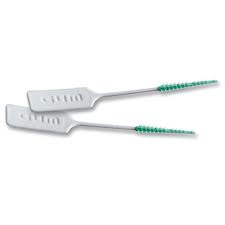
In another couple of lessons, we were exploring different mark making tools.  I used the little Gum dental soft picks as my 'pen' for the page on the left.  I just dipped it into the India ink as needed while I wrote.  It like the control I had with it so that I could write fairly easily while still getting a looser looking text that with a regular pen.

The page on the right was done using the dropper in the India ink bottle.  That was a bit harder to write with, but again it gives an interesting, loose text.

Judging by the watercolour background of the second page, I think I'm finally beginning to get a better feel for leaving some white space as I paint.  I'll need to keep working on that...

Thursday, February 28, 2013

Vintage...

Bonnie's challenge this week for Photo Art Friday was the word 'vintage'.  Well, after the fabulous gift I recently received there is no shortage of wonderful images to play with for this challenge!

Mouse over photo to see the 'before' image.
I chose this photo of my Dad.  It's funny to see a cigarette in his hand. He quit smoking when I was a baby so I have no memory of him as a smoker.

As you can see when you mouse over to see the original image, I cropped it to bring my father closer.  While still in Lightroom, I created a sepia version of the image.  I then took both the original cropped image and the sepia version into Photoshop Elements when I layer the sepia one over the other.  I kept it at 'normal' blend mode, but reduced the opacity to about 65% to allow some of the original colour to come back.

I know any snapshots from back then would have had a white frame around them, something that of course is missing from the digitized slides, so I brought in a vintage frame that I have in my files (sorry, I can't remember where it's from, but you'll be able to find lots such things by Googling it). I placed the photo into the frame and called it done!

Update:  I Googled 'free vintage frames for photoshop' and found this frame with the old vintage corners and the scalloped edge at this site.  There are so many wonderful 'freebies' out there! How cool is that!